Vulnerability Analysis in Kali Linux – Tools and Practical Overview
What is Vulnerability Analysis?
A vulnerability is a weakness in a system, application, or network that can be exploited by an attacker. Vulnerability Analysis is the process of identifying, classifying, and prioritizing these weaknesses before they are exploited.
Organizations perform vulnerability analysis to:
Detect security flaws
Prevent data breaches
Reduce attack surface
Strengthen overall system security
In penetration testing, this phase comes after Information Gathering.
In Kali Linux, these tools are available under:
Applications → Vulnerability Analysis
Types of Vulnerabilities
Vulnerabilities may include:
Open ports with insecure services
Outdated software versions
Misconfigured servers
Input validation flaws
Buffer overflow weaknesses
Web application vulnerabilities
Common Vulnerability Analysis Tools in Kali Linux
1️⃣ Bed
About Bed
Bed (Bruteforce Exploit Detector) is used to test services for buffer overflow vulnerabilities.
It sends malformed input to services to check if they crash.
Usage Example:
bed -s HTTP -t 192.168.56.102 -p 80
Purpose:
Detect buffer overflow
Test service robustness
Identify unstable services
2️⃣ Ohrwurm
About Ohrwurm
Ohrwurm is a SIP protocol fuzzer.
It is used to test VoIP servers for vulnerabilities in SIP implementations.
Key Use:
Test SIP-based communication servers
Detect malformed packet handling
Identify VoIP weaknesses
Common in telecom and VoIP security assessments.
3️⃣ Powerfuzzer
About Powerfuzzer
Powerfuzzer is a web application fuzzing tool.
It is used to:
Detect SQL injection
Test input validation
Identify web application vulnerabilities
Purpose:
Web form fuzzing
Automated vulnerability discovery
Parameter testing
4️⃣ Sfuzz
About Sfuzz
Sfuzz is a simple but powerful fuzzing tool.
It sends random or crafted data to a target application to check for crashes or abnormal behavior.
Common Use:
Buffer overflow testing
Protocol fuzzing
Service stability testing
5️⃣ Siparmyknife
About Siparmyknife
Siparmyknife is a SIP security testing tool.
It is used to:
Scan SIP servers
Perform SIP enumeration
Detect VoIP vulnerabilities
This tool is useful in:
Telecom infrastructure testing
VoIP penetration testing
6️⃣ Nikto
About Nikto
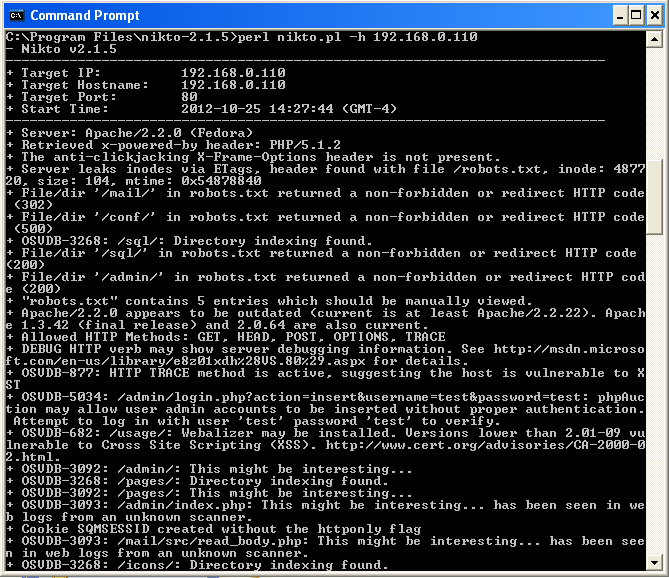
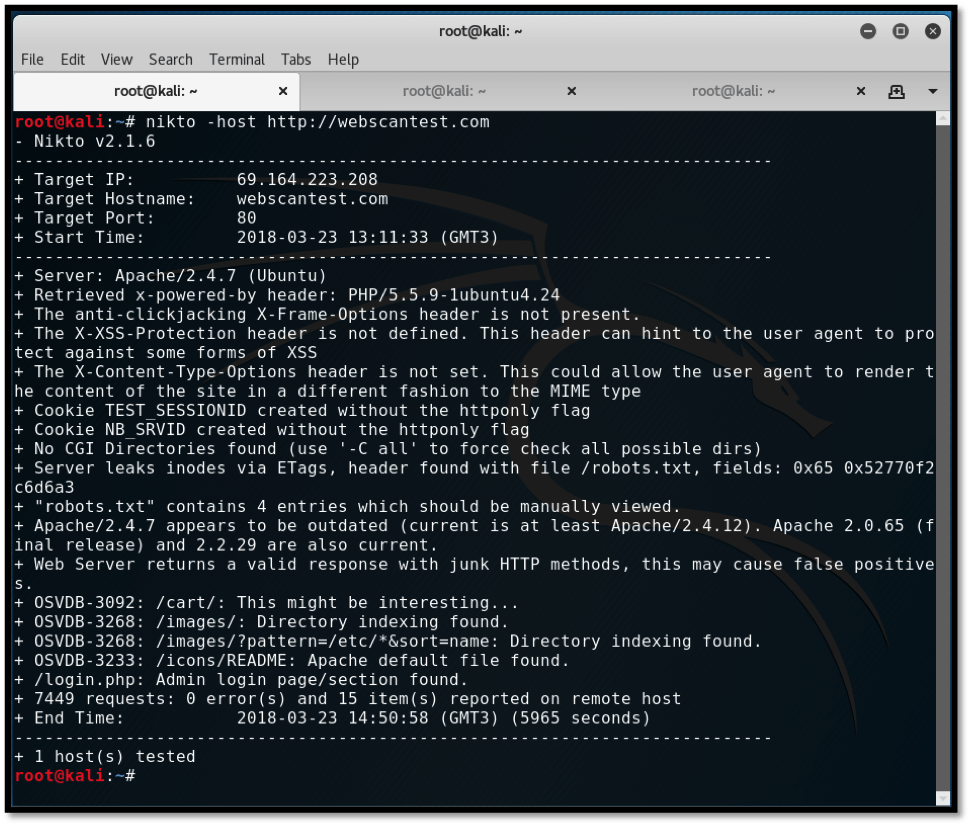
Nikto is one of the most popular web vulnerability scanners.
It scans web servers for:
Outdated software
Dangerous files
Misconfigurations
Default credentials
Known vulnerabilities
Example Usage:
nikto -h http://192.168.56.102
Sample Output May Reveal:
Server version
Missing security headers
Exposed directories
Known CVEs
Nikto Interface Example


Vulnerability Analysis Workflow
Step-by-step approach:
Identify live hosts (using Nmap)
Identify open ports
Detect service versions
Run vulnerability scanning tools
Analyze findings
Recommend mitigation
Patch and retest
Difference Between Scanning and Exploitation
| Phase | Purpose |
|---|---|
| Information Gathering | Collect data |
| Vulnerability Analysis | Identify weaknesses |
| Exploitation | Use weakness to gain access |
Vulnerability analysis does not mean hacking — it means identifying and reporting weaknesses responsibly.
Real-World Example
Before releasing a new operating system, companies perform:
Internal security testing
Code review
Vulnerability scanning
Patch management
This ensures:
Reduced security flaws
Better user protection
Stable release
Learning Outcomes
After understanding these tools, you will:
Identify server misconfigurations
Test web applications
Perform fuzzing attacks in lab
Detect VoIP vulnerabilities
Analyze vulnerability scan results
No comments:
Post a Comment