Digital Forensics in Kali Linux – Tools and Investigation Overview
What is Digital Forensics?
Digital Forensics is the process of identifying, collecting, preserving, analyzing, and presenting digital evidence from computers, storage devices, and networks.
It is used in:
Cybercrime investigations
Incident response
Data recovery
Malware analysis
Legal proceedings
In Kali Linux, forensic tools are available under:
Applications → Forensics
These tools help forensic specialists recover and analyze data in a legally sound manner.
Goals of Digital Forensics
Preserve original evidence
Maintain chain of custody
Recover deleted data
Analyze memory and disk artifacts
Generate legally admissible reports
Common Digital Forensics Tools in Kali Linux
1️⃣ Autopsy
About
Autopsy is one of the most widely used digital forensic tools.
It is a graphical interface for The Sleuth Kit and is used by:
Law enforcement agencies
Judicial investigators
Incident response teams
Key Features:
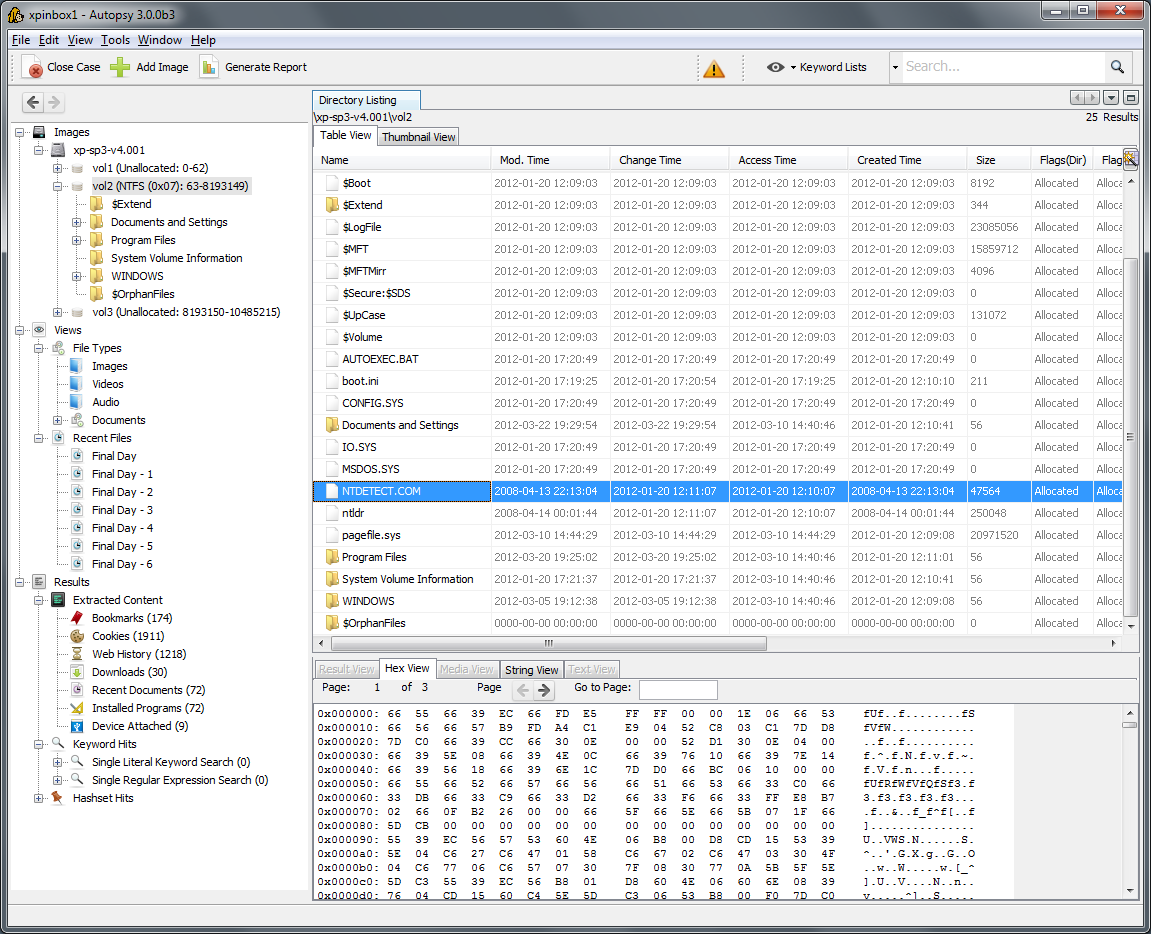
Disk image analysis
Deleted file recovery
Timeline analysis
Keyword searching
Email extraction
Web history recovery
Autopsy Interface


How It Works (Basic Steps)
Create New Case
Add Data Source (Disk Image / Drive)
Select analysis modules
Review extracted artifacts
Generate report
Autopsy is often the first tool used in disk-based forensic investigations.
2️⃣ Binwalk
About
Binwalk is used for analyzing firmware images.
It helps in:
Extracting embedded files
Reverse engineering firmware
Identifying hidden data
Example Usage:
binwalk firmware.bin
To extract contents:
binwalk -e firmware.bin
Commonly used in IoT device investigations.
3️⃣ Galleta
About
Galleta is used to analyze Internet Explorer cookie files.
It helps investigators:
Identify browsing behavior
Extract timestamps
Recover user activity
Used in browser-based forensic investigations.
4️⃣ Hashdeep
About
Hashdeep is used for computing and verifying file hashes.
Hashing ensures:
Evidence integrity
No tampering
Authenticity verification
Example Usage:
hashdeep -r /evidence_folder > hashes.txt
It generates hash values for files recursively.
This is critical in maintaining legal credibility of evidence.
5️⃣ Volafox
About
Volafox is used for analyzing memory dumps from macOS systems.
It helps in:
Extracting running processes
Identifying malware
Analyzing memory artifacts
Primarily used for macOS forensic investigations.
6️⃣ Volatility
About
Volatility is one of the most powerful memory forensic tools.
It analyzes RAM dumps to detect:
Running processes
Hidden malware
Network connections
Injected code
Rootkits
Example Usage:
volatility -f memory.dmp imageinfo
List processes:
volatility -f memory.dmp --profile=Win7SP1x64 pslist
Memory forensics is crucial because attackers often leave traces in RAM.
Types of Digital Evidence
Digital forensic tools can analyze:
Hard disks
USB drives
SSDs
Mobile devices
Memory dumps
Log files
Email archives
Digital Forensics Investigation Workflow
Identify and secure device
Create forensic image (bit-by-bit copy)
Calculate hash value
Analyze using forensic tools
Recover deleted artifacts
Document findings
Prepare forensic report
Real-World Example
In a cybercrime case:
A suspect's laptop is seized
Forensic image is created
Hash value is calculated
Autopsy analyzes disk image
Volatility analyzes RAM dump
Deleted emails and browser history are recovered
Evidence is presented in court
Comparison of Forensic Tools
| Tool | Purpose | Type |
|---|---|---|
| Autopsy | Disk analysis | GUI |
| Binwalk | Firmware analysis | CLI |
| Galleta | Cookie analysis | CLI |
| Hashdeep | Hash verification | CLI |
| Volafox | macOS memory analysis | CLI |
| Volatility | RAM forensic analysis | CLI |
Importance of Forensics in Cybersecurity
Digital forensics helps in:
Incident response
Insider threat investigation
Malware analysis
Legal compliance
Cybercrime prosecution
It bridges cybersecurity and law enforcement.
Legal & Ethical Considerations
Forensic analysis must:
Follow proper legal procedures
Maintain chain of custody
Preserve evidence integrity
Avoid evidence contamination
Improper handling can invalidate evidence in court.
No comments:
Post a Comment